
Sumio: Net Worth Tracker
FiduciaryFinance
3.85.00 Reviews
- Version
- 1.9.18
- Installs
- 10.00K
- Age Rating
- Everyone
Screenshots
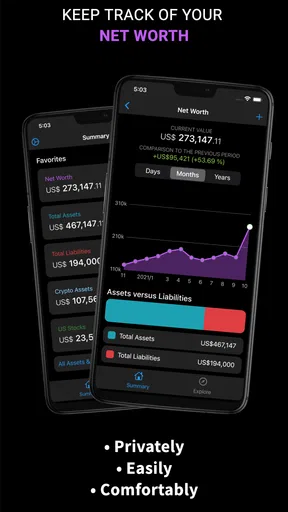
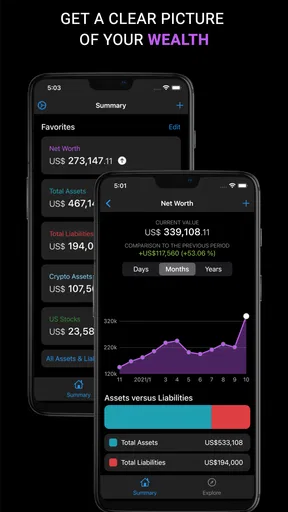
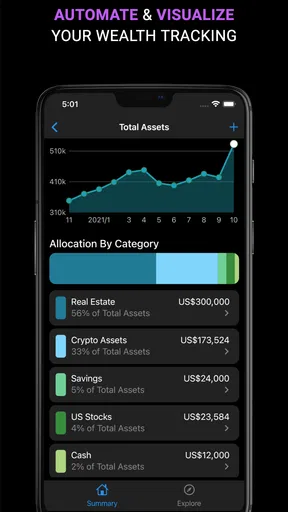
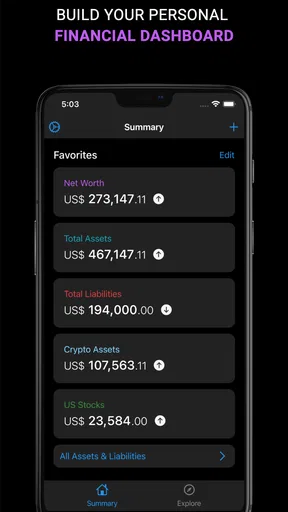
Our Review of Sumio: Net Worth Tracker
 Analysis by Appyee
I approached Sumio: Net Worth Tracker as a practical finance app rather than a complete banking replacement. Its purpose is to help me see my overall financial position by bringing together the value of investments, stocks, funds, and other assets in one place. That sounds simple, but it solves a problem that ordinary banking apps often leave unfinished: they may show cash and current accounts clearly while leaving investments, property, valuables, or other holdings scattered across different services.
My first impression is that Sumio is most useful when I want a calm, broad view instead of another stream of transactions. I can use it to ask a more meaningful question than “how much is in my main account?”: “What do I own, what is it worth, and how is my total position changing?” That makes it interesting for people who are beginning to organize their finances, as well as for experienced investors who want a separate overview of their assets.
The app is developed by Fiduciary and sits in the finance category. It is free to install, carries an Everyone age rating, and has reached over 10 thousand installs. Its average rating is 3.8 from around 80 ratings, which suggests a useful but not universally smooth experience. I would treat that rating as a reason to set realistic expectations: this is a focused tracking tool, not necessarily the polished all-in-one financial command center that every user will prefer.
How I would decide whether Sumio fits
I would decide whether Sumio belongs in my routine by naming one decision I want its overall picture to improve, rather than by adding every asset I own on day one. That makes the first trial easier to judge: does the overview clarify a choice, or just give me another screen to check? Next, I would look at the specific strengths that make its focused approach appealing.
Start with the job you want the app to do
The key decision is whether I need tracking or active financial management. Sumio is built around calculating and following net worth, investment portfolios, stocks, funds, and assets. If I want a dashboard for my financial picture, that focus is a strength. If I expect bill payments, detailed budgeting, tax preparation, trading, or direct control over financial accounts, I would look at a different type of app first.
Net worth tracking is especially helpful because it changes the way I review progress. A monthly budget tells me how money moved during a period. A net worth view tells me whether my overall position improved after considering assets and investments. Those are related, but they are not interchangeable. Someone can spend carefully while investment values fall, or earn more while allowing debts and unused purchases to grow. A dedicated overview can expose that bigger pattern.
I also consider how much manual organization I am willing to do. A tracker is only useful when its figures remain current. If I have a small number of assets and do not mind updating values, Sumio can be straightforward. If I hold many accounts, frequently trade, or want every number synchronized automatically, I would investigate whether the app’s workflow matches that expectation before making it the center of my financial routine.
The difference between a net worth view and a bank app
Most banking apps are designed around one institution. They are good at showing balances, card activity, transfers, and recent transactions inside that institution. Sumio approaches the problem from the opposite direction: it is concerned with the combined picture. That makes it valuable when my money is distributed between a bank, an investment platform, a retirement account, physical assets, and perhaps funds held elsewhere.
That broader view can also be more honest. Looking only at a current account may make finances seem simpler than they are. Adding investments and other assets gives me a better starting point for decisions such as building an emergency reserve, changing my savings rate, or deciding whether a large purchase is genuinely affordable. The important point is that net worth is a snapshot, not a complete measure of financial health. It should sit beside cash-flow and debt information rather than replace them.
What I would prepare before using it
I would begin by listing the assets I actually want to monitor, rather than entering every possible detail immediately. That might include cash, shares, funds, and larger assets whose value matters to my personal picture. I would then decide on a consistent update routine. For example, I might review liquid accounts more often and reassess less frequently changing assets on a regular schedule.
This preparation matters because inconsistent valuations can create misleading progress. If I update one investment but leave another at an old value, the total may look better or worse for reasons that have nothing to do with my decisions. Sumio can provide the container for the information, but I still need a sensible method for maintaining it.
Where the focused design works best
The focused design works best when I want to compare unlike pieces of my financial life without turning the app into a budgeting or trading workspace. I find that separation useful: it keeps the purpose of a review clear and makes a quick check less likely to become an unnecessary dive into individual market movements. That benefit matters most when the asset list stays manageable.
A useful home for scattered assets
The clearest strength is the app’s narrow purpose. Instead of forcing me to interpret several separate balances, it gives me a place to think in terms of total ownership. That is useful for freelancers, couples managing money across different providers, and investors who want to see stocks and funds alongside ordinary assets.
I particularly like the idea of separating the emotional experience of investing from the practical task of measuring progress. Investment platforms tend to encourage attention to individual holdings and market movement. A net worth tracker encourages me to step back and consider the whole picture. That can reduce the temptation to judge my finances by the performance of one stock or one fund alone.
An everyday scenario where it earns its place
Imagine I am planning to move home or make another major purchase. My bank app shows the cash I can access, while my investment service shows a portfolio, and other assets are not represented anywhere. I could manually calculate everything in a spreadsheet, but that creates another document to maintain and makes it easy to forget an account. A dedicated tracker gives me a repeatable place to record the broader position.
Before making the decision, I could review the total value of my assets, distinguish long-term holdings from money that is realistically available, and avoid treating every asset as spendable cash. That last distinction is important. A portfolio may have a value, but selling it can involve timing, taxes, risk, or a loss of future growth. The app can improve visibility, while the final decision still requires judgment.
Three practical habits that make the tracker more useful
- Use it as a review tool, not a reason to check constantly. Net worth can move with markets, so frequent checking may create noise instead of insight. A planned review makes changes easier to interpret.
- Keep categories meaningful. Grouping assets by their real purpose helps me distinguish emergency money, long-term investments, and items that are valuable but difficult to sell. A single total is convenient, but the categories explain what that total can actually do for me.
- Record a baseline before changing strategy. If I start saving more or alter my investments, an initial snapshot gives me something to compare later. Without that baseline, I may remember the starting point inaccurately and draw the wrong conclusion.
These habits are not flashy features, but they are where a tracker becomes genuinely useful. The value comes from making better comparisons over time, not from entering a number once and forgetting about it.
What the current package tells me
The current version is 1.9.18, and the app supports devices running Android 7.0 or later. That makes it accessible to people using older Android hardware, which is welcome for a finance tool that does not need to be tied to a brand-new phone. The free entry point also makes it easy to test the workflow before deciding whether it deserves a permanent place in my routine.
There are in-app purchases ranging from $2.99 to $29.99 per item. Because the basic download is free, I would pay attention to which parts of the experience require payment before building a complicated tracking system around it. The sensible approach is to start with a small, representative setup and confirm that the free experience handles the information I care about.
Where I feel friction
The main limitation is the same trade-off that makes focused trackers appealing: the app’s value depends on the quality and freshness of the information I maintain. If I want a fully automatic financial picture, manual entry or manual review can become tiring. Even a well-designed interface cannot remove the work involved in checking prices, correcting changes, or deciding how to value an asset that does not have a simple live market price.
I would also avoid treating the headline total as a precise statement of financial security. Investments fluctuate, some assets are hard to sell quickly, and personal possessions may not realize their estimated value in a real sale. Sumio can help me organize those figures, but it cannot turn uncertain valuations into guaranteed money. That is a limitation of the subject itself, not just the app.
The rating of 3.8, based on around 80 ratings and five written reviews, reinforces my cautious view. There is enough interest to show that the concept appeals to users, but not enough evidence for me to describe it as a universally dependable solution. I would test it with non-sensitive, simple entries first and see whether the update process feels comfortable.
When another category may be better
There are cases where a different category is a better fit, and I would rather recognize that early than force Sumio to do a job it was not built around. If my main need is transaction-level spending control, active investing, or hands-off account consolidation, I would start with a tool designed for that task. The next question is what a switch would actually ask of me.
Choose a budgeting app for day-to-day control
If my biggest problem is overspending, irregular bills, or not knowing where my salary goes, a budget-first app is likely a better starting point. Budgeting tools are designed around transactions, spending categories, limits, and cash flow. Sumio’s net worth perspective can complement that work, but it is not the most direct answer to “why did I spend so much this month?”
I would use a budget tool when I need immediate behavioral feedback, then use a net worth tracker when I want to measure the longer result. The two views answer different questions. Choosing Sumio alone will not automatically create a spending plan or teach me which recurring costs are draining my account.
Choose an investment platform for trading and research
Investors who need to buy and sell securities, study market information, or manage orders should stay with an investment platform for those tasks. A tracker can help summarize holdings, but it should not be confused with a brokerage account. The better arrangement may be to use the investment service for transactions and Sumio for a wider personal balance sheet, provided the maintenance effort is acceptable.
Choose a spreadsheet when complete control matters most
A spreadsheet remains attractive for people who want custom formulas, detailed notes, scenario planning, or a personal valuation method. It can represent debts, future contributions, property estimates, and unusual assets in exactly the format I choose. The downside is that I must design, protect, and maintain it myself.
Sumio is more appealing when I want a ready-made mobile destination rather than a project. A spreadsheet is better for experimentation and complex modeling; a dedicated app is better for a repeatable check-in. I would not move to Sumio if my existing spreadsheet already gives me clear history and takes little effort to update.
Choose an account aggregator when automation is non-negotiable
Some users mainly want accounts connected and balances refreshed with minimal intervention. That category may fit better if automation is the deciding factor. Sumio’s appeal is its focused net worth perspective, but I would not assume that a broad overview automatically means every source updates itself in the way I expect. Anyone with numerous financial providers should test the exact workflow before switching.
There is also a privacy and trust decision whenever financial information is gathered in one place. I would read the app’s current store and in-app explanations carefully, use a strong device lock, and avoid entering information I do not need for the intended calculation. Convenience is valuable, but a financial dashboard should be deliberately designed rather than casually filled with every personal detail.
The real cost of switching
The real cost of switching is not just moving figures; it is deciding which numbers deserve ongoing attention and establishing a routine that keeps them credible. I would bring over only the information that supports decisions I expect to revisit, then preserve a separate starting record so I am not locked into one app. With that in mind, the recommendation depends on the kind of user and habit involved.
Moving from scattered notes or spreadsheets
Switching is easiest when my current method is inconsistent. I would first capture the figures that matter today, then recreate only the categories I will actually review. Trying to reproduce years of historical detail immediately can turn a simple tracker into a tedious migration project. A clean starting point is often more useful than a crowded record full of uncertain old values.
I would also keep a private record of the starting totals and the date of the first review. That gives me a reference if I later decide the app is not for me. It prevents the common mistake of treating a new tool as the only place where important financial history exists.
Moving from a bank or investment app
The switch is less about replacing those services and more about adding a second viewpoint. I would continue using the bank for banking tasks and the investment provider for investment tasks, while using Sumio as the summary layer. This division keeps expectations clear and reduces the risk of assuming that a tracking total has the same function as an account balance.
The time cost comes from maintenance. If the app fits naturally into a weekly, monthly, or quarterly routine, the extra step may be small. If I repeatedly postpone updates, the dashboard will become less trustworthy. The best schedule is the one I can follow consistently, not the one that sounds most thorough.
What to check before paying
Since the app is free but offers in-app purchases from $2.99 to $29.99 per item, I would identify the exact paid capability I need before spending anything. I would also check whether the purchase solves a real limitation in my workflow or simply adds detail I am unlikely to use. For a personal tracker, paying can be reasonable when it saves repeated effort, but it is not automatically worthwhile just because the feature is available.
My test would be simple: enter a modest set of assets, review the result after a few days, and decide whether the process makes my finances clearer. If I cannot explain what action the total helps me take, I would not expand the setup or pay for extras.
My recommendation for different kinds of users
For someone who enjoys a periodic financial check-in, Sumio is worth trying as a focused overview; for someone who dislikes upkeep, even a simple tracker can become stale. I would choose the smallest setup that answers a real question, then keep it only if the habit remains useful after the novelty wears off. That is the practical distinction behind my recommendation for different users.
Who I would recommend it to
I would recommend Sumio to someone who wants a mobile net worth overview and is comfortable taking responsibility for the figures. It is a good candidate for an early-stage investor, a person with assets spread across several services, or anyone who wants to stop judging financial progress from a single bank balance. Its focused scope makes sense when the goal is perspective rather than transaction management.
I also think it can work well for a person who is beginning to build a financial routine. The free download lowers the barrier to trying the idea, while the Everyone rating and Android 7.0 minimum make it approachable on a broad range of devices. I would start small, establish categories, and use the app to support regular reviews rather than chase daily market changes.
Who should skip it
I would skip it if I need a full budget, direct trading, detailed tax records, or a completely automated account hub. I would also hesitate if I know I will not update values. In that situation, the app may create a false sense of control: the screen looks organized, but the underlying numbers gradually stop representing reality.
People with complicated financial planning needs may prefer a spreadsheet, specialist investment software, or professional advice alongside a tracker. A net worth total is useful context, but it does not decide how much risk I should take, whether an asset is appropriately valued, or what tax consequences a sale may create.
My final view
Sumio: Net Worth Tracker has a sensible purpose and a useful place between a bank app, a budget tool, and an investment platform. I like it most as a calm summary of assets that would otherwise remain divided between services. Its strongest idea is not simply adding numbers; it is encouraging me to think about financial progress as a whole.
My recommendation is therefore conditional but positive: try it if your main need is a consolidated net worth view, begin with a small set of assets, and judge it by how easy it is to keep current. Do not choose it expecting a replacement for banking, budgeting, or brokerage tools. The best reason to use Sumio is clearer financial perspective, not more financial activity. For that specific job, it is worth testing, while users who prioritize automation or detailed cash-flow control should compare it with tools built around those needs.
With its free starting point, current version 1.9.18, and optional purchases, I see it as a practical experiment rather than a commitment. If the review routine becomes natural and the total helps me make better decisions, it can earn a permanent role. If maintaining the figures feels like another chore, a spreadsheet or automated aggregator may be the better fit.
Verdict
Strengths of Sumio: Net Worth Tracker
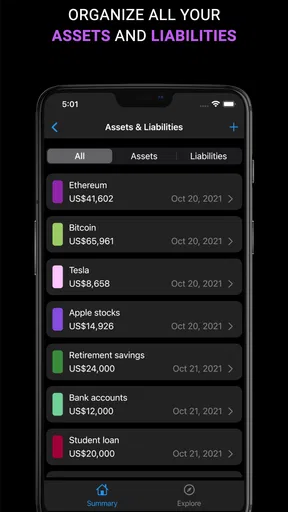
- Tracks assets, debts, and net worth in one organized dashboard.
- Supports multiple currencies for users with international finances.
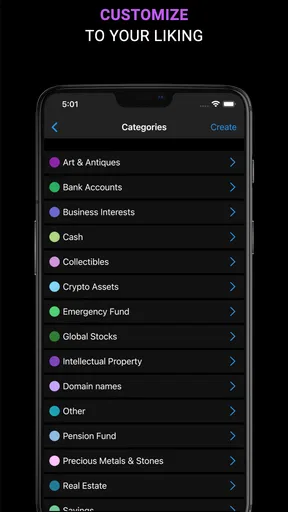
- Custom categories help tailor tracking to personal financial goals.
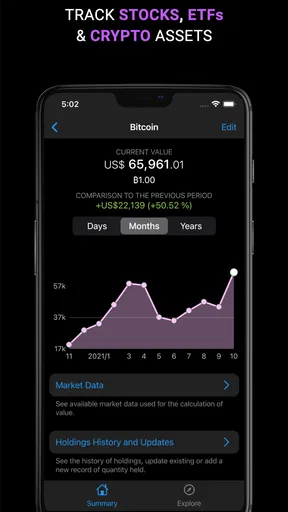
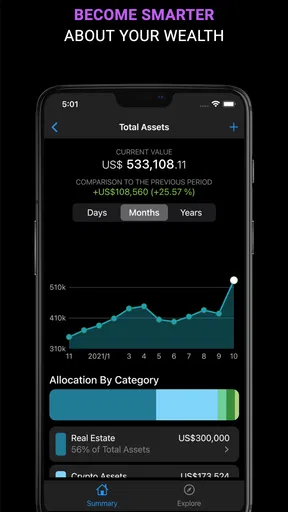
- Charts make changes in wealth easier to understand over time.
- Can encourage consistent financial awareness and better money habits.
Limitations of Sumio: Net Worth Tracker
- Manual data entry may become time-consuming for users with many accounts.
- Some advanced features may require a paid subscription.
- Net worth results depend on keeping balances accurate and up to date.
- Financial data may raise privacy concerns for cautious users.
- It may lack direct support for certain banks or regional financial services.
Similar Picks in This Category
View All
Google Wallet
Google LLC4.3

Airtel: Recharge, Bank & Loans
Airtel4.0

PayPal - Pay, Send, Save
PayPal Mobile4.2

DANA Indonesia Digital Wallet
PT Espay Debit Indonesia Koe4.5

Binance: Buy Bitcoin & Crypto
Binance Inc.4.8

Cash App
Block, Inc.4.7
Frequently Asked Questions
What is Sumio: Net Worth Tracker used for?
Sumio: Net Worth Tracker is a personal finance app designed to help you monitor your overall financial position in one place. You can record assets such as bank balances, investments, property, and digital currencies, then subtract liabilities like loans or credit card debt. The app focuses on tracking net worth over time rather than replacing a full banking service or financial adviser.
Can I connect my bank and investment accounts to Sumio?
Sumio may allow users to add financial information manually or connect selected accounts through supported integration services, depending on the country, platform, and available provider coverage. Account connections can vary, so it is worth checking the current list of supported institutions before downloading. If your bank is unavailable, you can still use the app by entering balances and updating them yourself.
Is Sumio: Net Worth Tracker free to use?
The app can generally be downloaded and used with basic tracking features, but some advanced tools may require a subscription or in-app purchase. Premium access can include expanded account management, richer charts, additional customization, or more detailed financial insights. Pricing and included features may change, so review the purchase screen and subscription terms carefully before confirming payment.
Is my financial information safe in Sumio?
Sumio handles sensitive financial information, so privacy and security should be considered before use. Review the app’s privacy policy to understand what data is collected, where it is stored, and whether connected-account providers are involved. Avoid sharing passwords outside official connection screens, enable device security, and remember that manually entered information may still reveal a detailed picture of your finances.
Does Sumio provide financial advice or help me manage a budget?
Sumio is mainly intended for organizing and visualizing net worth, not for providing personalized investment recommendations or professional financial advice. Depending on the version, it may offer trends, categories, charts, and progress tracking that help you understand your finances. However, users remain responsible for verifying balances, interpreting the information, and making decisions based on their own circumstances.
